Kai
Kai is your AI assistant for numerical experiments on the Kothar platform. It understands Aleph natively, has direct access to the language reference and documentation, and validates its own output — ready from the first message with no setup or plugins required.
Use Kai to go from idea to working implementation faster: ask it to explain an unfamiliar file, turn a numerical method into Aleph code, investigate an error from the output panel, create a Markdown tutorial, or prepare changes to a Figure or visual editor file (such as the Lattice Model editor).
What Kai Can Help With
- Aleph code: write scripts, explain syntax, refactor existing code, debug diagnostics, and propose validated snippets.
- Scientific computing: reason through numerical methods, simulation workflows, and the mathematical foundations behind your experiments.
- Workspace files: inspect open files, search the workspace, read relevant text files, and connect code across a project.
- Figures and visual editors: create or edit files for Figures and visual editors (such as the Lattice Model editor) using their registered schemas.
- Documentation: draft Markdown explanations, tutorials, and code walkthroughs that fit naturally beside your workspace files.
- Execution output: review the selected output, console text, or recent execution results when you need help diagnosing a run.
- Research support: search for relevant arXiv papers when a scientific question benefits from primary literature.
- Workspace memory: remember durable preferences, conventions, and decisions for the current workspace so those details carry into future conversations.
Under the Hood
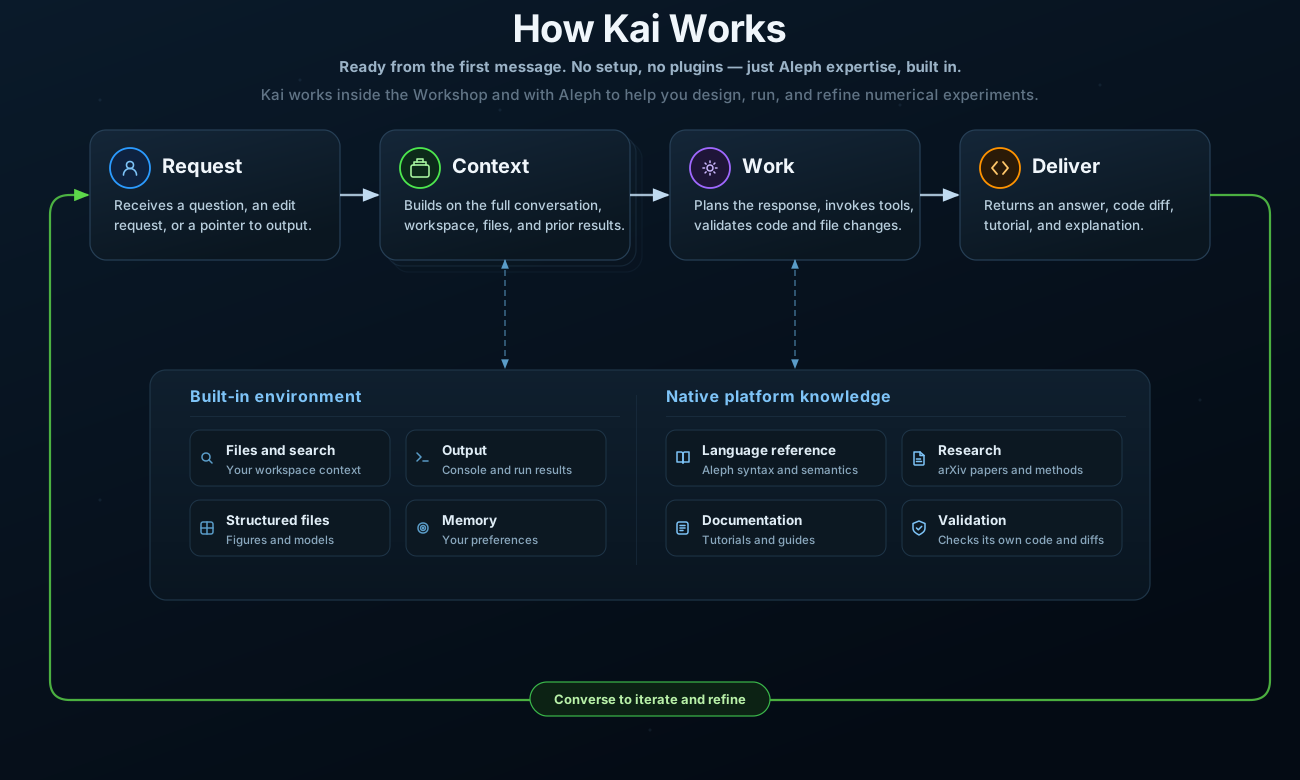
Kai builds on the full conversation and your current Workshop context — open files, selections, workspace search, and execution output. It then chooses the right tools for the task: checking the Aleph language reference, searching documentation, validating code through the LSP, or verifying structured files against their schema.
Every code snippet and diff Kai produces is validated before it reaches you. If something doesn't pass, Kai iterates internally until it does.
Working with Kai
Kai sees what you see. Open the relevant file, select the region you care about, or point Kai at the output panel — no need to paste code into chat.
By default, Kai never touches your files. It presents suggestions as diffs you can review and apply on your terms. Once you're comfortable, enable Allow Kai to edit files in the composer and Kai will apply changes automatically — you can always review and revert from the Workshop like any other edit.
Converse to iterate
Each message builds on the last. Refine your request, ask follow-up questions, or redirect — Kai keeps the full context of the conversation and gets closer to what you need with each turn. The conversation is the workflow.
Keep the same conversation when you're iterating on a single task: refining a function, exploring variations of an approach, or debugging a specific run. The accumulated context helps Kai make better suggestions with each turn.
Start a new conversation when you switch to an unrelated task or want a fresh perspective. A long conversation with mixed topics can dilute context and lead to less focused answers. When in doubt, a new conversation is cheap — Kai still has access to your workspace and memory.
Useful Ways To Ask
Getting started
- "What does this file do? Walk me through it."
- "How do I define a 2D square lattice with nearest-neighbor hopping?"
Writing and editing code
- "Write an Aleph function that computes eigenvalues using sparse diagonalization."
- "Refactor this to use parallel containers instead of the manual loop."
Debugging
- "My last run failed. Look at the output and explain what went wrong."
- "This gives the right shape but wrong values — what could cause that?"
Iterating
- "Good, now add periodic boundary conditions."
- "Can you try a different approach? I want to avoid the explicit loop."
Research and documentation
- "Find recent papers on DMRG for frustrated magnets and summarize the key algorithms."
- "Explain the Jordan-Wigner transformation and show me how to implement it in Aleph."
Figures and visual editors
- "Create a figure that plots the energy spectrum vs. momentum for a 1D chain."
- "Build a honeycomb lattice Hubbard model with spin-orbit coupling."
Workspace management
- "Search my project for where
hamiltonianis defined." - "Remember that this workspace uses natural units throughout."